Overview
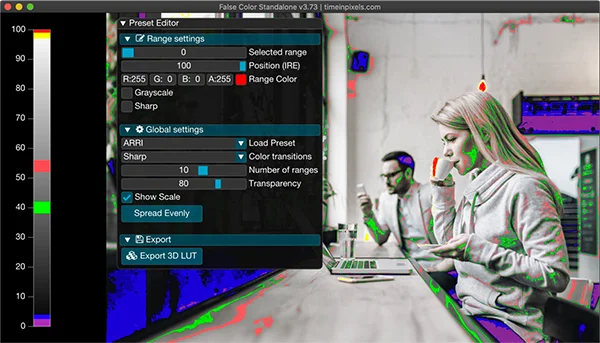
False Color by Time in Pixels is one of the most useful tools for exposure monitoring and shot matching in post-production. It brings the familiar false color camera tool into DaVinci Resolve and other OpenFX hosts, giving you real-time exposure reference directly in your grading environment.
Version 3.0 introduces GPU acceleration for real-time playback on DaVinci Resolve, 13 high-quality and accurate presets including SmallHD and Zacuto, customizable false color ranges with up to 15 zones, and the ability to export your fine-tuned overlay as a 3D LUT for use on camera monitors on set.
The scale overlay mode renders in a separate layer that can be moved anywhere in the workspace without obstructing the picture. Additional features include saturation mode for matching saturation from shot to shot, grayscale ranges, and custom transitions between colors.
Stop buying plugins. Build your own.
Every plugin you buy solves someone else's problem. Through The Forge skill packs, you can teach Claude Code to write, test, and install custom DaVinci Resolve tools in plain English. Save money, learn the workflow, and own your tools forever.

Pros
- GPU-accelerated real-time playback in DaVinci Resolve
- Export custom false color overlays as 3D LUTs
- 13 accurate presets including SmallHD and Zacuto
- Saturation mode for matching shot-to-shot saturation
- Scale overlay mode keeps workspace unobstructed
- 14-day free trial available
Cons
- Paid plugin (€39.99)
- Remote False Color app sold separately (€12.99)
- Standalone image viewer is a separate purchase (€29.99)
- No Linux support
Verdict
An essential tool for colorists and DPs who need reliable exposure reference in post. The GPU acceleration and LUT export make it a practical bridge between set and suite.
Reviewed by JérémyRelated DaVinci Resolve Plugins from the Store