Best Free DaVinci Resolve Plugins (2026)
You do not need to spend money to get professional results in DaVinci Resolve. The free and freemium plugin ecosystem has grown into a serious resource for indie filmmakers, YouTubers, colorists, and editors on a budget. From spectral film emulation and VFX compositing to motion graphics, speed ramps, captions, and audio-reactive visuals, there are now free tools that rival paid alternatives. We compared six of the best free and freemium plugins for DaVinci Resolve in 2026: Reactor, spektrafilm OFX, MagicAnimate V3, Speed Ramp Lite, Snap Captions 2, and sh4rk Audio Visualiser. We compared them across price, category, Resolve Free support, learning curve, key strengths, and best use case to help you build a powerful zero-cost workflow.
Why use free plugins in DaVinci Resolve?
DaVinci Resolve already delivers an impressive amount of value in its free version, including professional editing, color grading, VFX, and audio tools. But free plugins extend that value even further. They add specialized features, speed up repetitive tasks, and open creative options that would otherwise require expensive software or hours of manual work. For students, indie creators, and anyone building a post-production suite on a tight budget, the right free plugins can close the gap between Resolve Free and much more expensive workflows.
What to look for in a free plugin
Start by checking Resolve Free compatibility. Some plugins require DaVinci Resolve Studio, even if the plugin itself is free. Next, consider the learning curve. Tools like Speed Ramp Lite and Snap Captions 2 are designed for fast, simple use, while Reactor and sh4rk Audio Visualiser target users comfortable with Fusion. Also look at whether the tool is truly free or freemium. Freemium plugins may lock advanced features behind a paid upgrade, which is fine if the free tier covers your needs. Finally, think about update frequency and community support, since free plugins often rely on community feedback rather than official customer service.
Free vs. freemium: what is the difference?
A free plugin gives you the full feature set at no cost, usually maintained by a community or a creator giving back to the Resolve ecosystem. Reactor, spektrafilm OFX, and Speed Ramp Lite fall into this category. A freemium plugin offers a free core version with optional paid upgrades for more templates, presets, or advanced controls. MagicAnimate V3, Snap Captions 2, and sh4rk Audio Visualiser use this model. Both can be excellent, but knowing which model a plugin follows helps you avoid surprises when you hit a paywall mid-project.
How we compared these plugins
We built this comparison around the criteria that matter most when assembling a free plugin workflow for DaVinci Resolve: price model, category, Resolve Free support, learning curve, key strength, and best use case. The ratings come from a mix of hands-on testing, official documentation, published feature sets, demo versions where available, and community feedback from editors and creators who rely on these tools daily. The comparison table below summarizes the results, followed by detailed verdicts for each tool.
| Feature | Reactor | spektrafilm OFX | MagicAnimate V3 | Speed Ramp Lite | Snap Captions 2 | sh4rk's Audio Visualiser Plugin |
|---|---|---|---|---|---|---|
| Price | Free | Free | Freemium (~$29.99 for presets) | Free | Freemium (Pro upgrade available) | Freemium ($31.90 for Full Edition) |
| Category | VFX / Compositing | Color / Film Emulation | Transitions / Animation | Transitions / Speed Ramp | VFX / Captions | VFX / Audio Visualization |
| Resolve Free Support | Yes | Yes | Yes | No (Studio only) | Yes | Yes |
| Learning Curve | Moderate to advanced (Fusion tools) | Moderate (deep controls; flow variant easier) | Easy (no keyframes needed) | Very easy (one-click curves) | Easy (template-based) | Advanced for Free, easy for Full |
| Key Strength | 200+ free community tools and effects | Spectral film pipeline with real stocks | Instant animation without keyframes | Smooth In/Out speed ramps in one click | 50+ customizable caption templates | Real-time audio reactive visuals |
| Best For | Budget VFX and compositing workflows | Free alternative to Dehancer / Filmbox / EMUL8 | Editors who hate keyframing motion | Studio users needing fast speed ramps | Social media creators and subtitling | Music videos and reactive motion graphics |
Stop buying plugins. Build your own.
Every plugin you buy solves someone else's problem. Through The Forge skill packs, you can teach Claude Code to write, test, and install custom DaVinci Resolve tools in plain English. Save money, learn the workflow, and own your tools forever.
Our selection of the best free plugins for DaVinci Resolve
Reactor: The Essential Free VFX Toolkit Winner Best Free
If you only install one free plugin for DaVinci Resolve, make it Reactor. This community-driven package manager gives you instant access to hundreds of Fusion macros covering everything from advanced color grading utilities to particle systems, tracking tools, and UI enhancements. Reactor turns the free version of Resolve into a legitimate compositing workstation. For indie filmmakers, students, and anyone building a budget post-production suite, Reactor is non-negotiable.
spektrafilm OFX: The Best Free Film Emulation Plugin Runner-up
spektrafilm OFX is a free OpenFX plugin that simulates the full photochemical pipeline spectrally, from camera exposure and negative development to optical printing and scanning. It includes 16 camera-negative stocks and 8 print stocks and papers built from real density curves and spectral data, plus format-scaled grain, halation, diffusion, and LUT export. For colorists who want Dehancer or Filmbox-style results without the price tag, this is the most powerful free alternative in the Resolve ecosystem. Shooting stills instead? My free Halation Lab brings the same kind of analog halation glow to photos right in the browser.
MagicAnimate V3: Animation Without Keyframes
MagicAnimate V3 eliminates the most tedious part of motion design: keyframes. The free core version lets you animate transform, motion blur, shadows, and in-out transitions using simple drag-and-drop controls. It works on videos, images, text, and adjustment clips. The paid preset pack adds 70+ ready-made animations, but the free version alone is enough to speed up most editing sessions.
Speed Ramp Lite: One-Click Speed Ramping
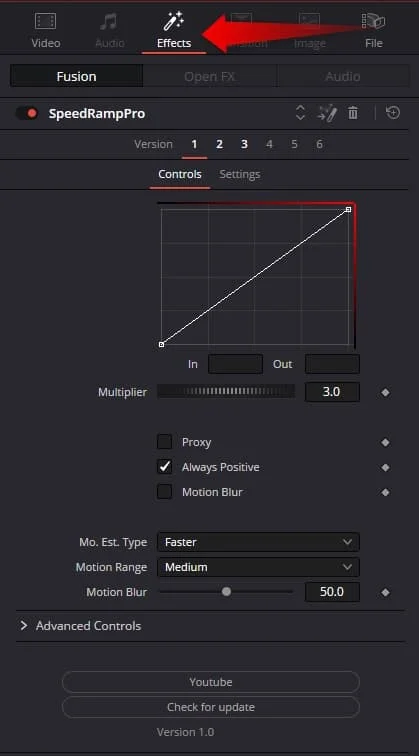
Resolve's native time remapping can be a headache. Speed Ramp Lite fixes that with a single Fusion effect that applies smooth In or Out curves directly to compound clips. No manual keyframes, no guesswork. It is completely free and perfect for creators who want cinematic speed ramps without wrestling with Resolve's built-in tools. Note that it requires DaVinci Resolve Studio.
Snap Captions 2: Pro-Looking Subtitles in Seconds
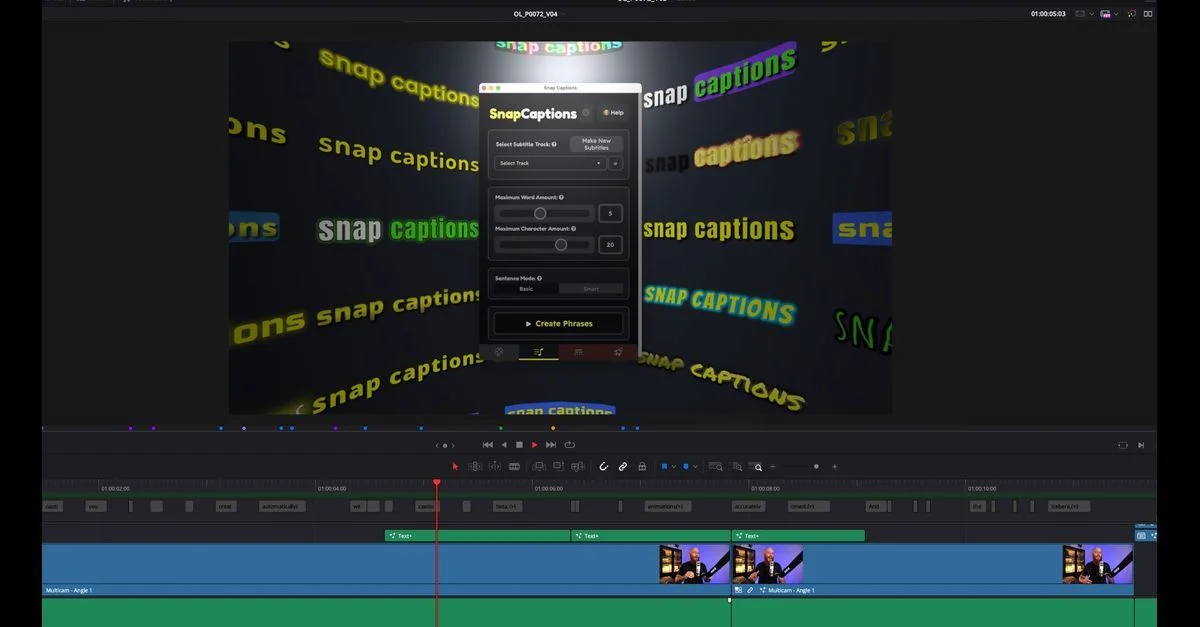
Snap Captions 2 is the best free captioning plugin for DaVinci Resolve. The free version includes auto-generation, live positioning, and smart word grouping. You also get access to a subset of the 50+ templates, ranging from clean professional looks to kinetic social media styles. The Pro upgrade unlocks premium templates and dynamic workflows, but the free tier is already a massive time-saver for YouTubers and content creators.
sh4rk Audio Visualiser: Real-Time Reactive Motion
Turn any audio track into a visual performance with sh4rk's Audio Visualiser Plugin. The Free Edition includes 70+ Fusion Macros for advanced users who want full creative control. The Full Edition upgrades that to 18 drag-and-drop Edit Page visualizers for a seamless workflow. If you edit music videos, podcasts, or any content where audio drives the visuals, this is the best free audio visualization tool for Resolve.
Reactor remains the best overall free plugin because of its sheer breadth across VFX, compositing, and color utilities. spektrafilm OFX is the most impressive new free color tool on the list: a spectral film emulation engine with 16 negative and 8 print stocks/papers that competes head-to-head with paid plugins like Dehancer, Filmbox, and EMUL8. MagicAnimate V3, Speed Ramp Lite, Snap Captions 2, and sh4rk Audio Visualiser round out the selection for animation, speed ramps, captions, and audio-reactive motion graphics.