This page contains affiliate links. We may earn a commission at no extra cost to you when you buy through them. Learn more
Best Color Grading Plugins for DaVinci Resolve
Finding the best color grading plugin for DaVinci Resolve means deciding how much film character you want and how deep you are willing to go. Resolve already ships with world-class color wheels, curves, HDR grading, and node-based color management, but film emulation plugins go further: they model grain, halation, print density, and photochemical response so digital footage can match the organic texture of scanned negative. We tested and compared six leading film emulation tools for Resolve: Dehancer Film, FilmConvert Nitrate, EMUL8, Filmbox Looks, Filmkid 16, and the free spektrafilm OFX. We compared them across stock library, halation quality, ease of use, system requirements, and price to help you choose the right one for your workflow.
Why use a film emulation plugin in DaVinci Resolve?
DaVinci Resolve is already the industry standard for color grading. Its built-in toolset covers almost every modern finishing need, from primary correction and HDR grading to power windows and tracking. But when the goal is to recreate the look of photochemical film (the grain structure, highlight bloom, color separation, and print density that make 16mm or 35mm images feel alive), a dedicated film emulation plugin saves hours of manual node work. These plugins model real film stocks, camera response curves, lab development, and print processes so you can apply a cinematic look without rebuilding the photochemical pipeline from scratch. The best options do more than slap a LUT on the image: they simulate how light interacts with film emulsion, which gives results that hold up across different cameras, exposure levels, and delivery formats. If you work with stills rather than video, I rebuild the same red halation glow for free in the browser with Halation Lab, and my Fujifilm film recipes deliver an analog look straight out of camera with no plugin at all.
What to look for in a film emulation plugin
Stock library and accuracy come first. Plugins like Dehancer Film and Filmbox Looks are built from measured film data and offer dozens of negative and print combinations based on real Kodak and Fujifilm stocks. Next, look at halation and grain quality: the most convincing plugins simulate red-biased halation and format-scaled grain rather than overlaying generic noise. Ease of use, Resolve Free versus Studio support, and workflow format also matter. DCTL-based tools such as EMUL8 are lightweight and fast, while OFX plugins integrate directly on the Color page with full UI controls. PowerGrades like Filmkid 16 are transparent and editable but rely on Resolve native nodes. Finally, consider your budget, because spektrafilm OFX proves that a professional spectral pipeline can be completely free.
OFX, DCTL, or PowerGrade: which format is right for you?
DaVinci Resolve supports film looks in several forms, and the right choice depends on your workflow. OFX plugins such as Dehancer Film, FilmConvert Nitrate, Filmbox Looks, and spektrafilm OFX install as Color page effects with dedicated interfaces and real-time previews. They tend to offer the deepest control but can be more demanding on the GPU. DCTLs like EMUL8 run as native GPU code and stay extremely lightweight, which makes them ideal for performance-sensitive timelines or heavy node trees. PowerGrades like Filmkid 16 are pure Resolve node setups: fully editable, transparent, and excellent for learning, but they depend on Resolve built-in tools rather than a dedicated film engine. Choose OFX for depth and authenticity, DCTL for speed and efficiency, and PowerGrade for flexibility and education.
How we compared these plugins
We built this comparison around the criteria that matter most when choosing a film emulation plugin for DaVinci Resolve: price, film stock selection and authenticity, halation and grain quality, ease of use, camera input handling, system requirements, and overall workflow fit. The ratings come from a mix of hands-on testing, official documentation, published feature sets, demo versions where available, and community feedback from colorists and editors who use these tools daily. The comparison table below summarizes the results, followed by detailed verdicts for each tool. Whether you are a colorist chasing the most accurate analog texture or an editor who needs a fast, camera-matched film look, this guide will help you find the best color grading plugin for your DaVinci Resolve workflow.
| Feature | Dehancer Film | FilmConvert Nitrate | EMUL8 | Filmbox | Filmkid 16 | spektrafilm OFX |
|---|---|---|---|---|---|---|
| Price | $179 (perpetual) | $129 (perpetual) | $196 (perpetual) | $199 (perpetual) | $129 (perpetual) | Free |
| Film Stocks | 60+ negative & print stocks | 20+ camera-matched stocks | 15 Kodak/Fuji-inspired stocks | 100+ tuned presets | 16mm-inspired PowerGrade + LUT | 16 negative + 8 print stocks/papers |
| Halation Quality | Excellent (physically modeled) | Good (simplified) | Good (modeled) | Excellent (empirical data) | Good (PowerGrade nodes) | Excellent (spectral pre-development scatter) |
| Ease of Use | Moderate (dense UI) | Easy (clean interface) | Easy (DCTL, fast setup) | Easy (preset-based) | Very easy (drag-and-drop) | Moderate (deep controls; flow variant easier) |
| Camera Profiles | Generic input profiles | Extensive camera-specific | Generic input profiles | N/A (preset-based) | Works with any camera/phone | Color-managed input (log / scene-linear) |
| Best For | Purists seeking analog depth | Editors needing camera-matched speed | Lightweight Resolve-native workflows | Cinema-grade output quality | Beginners & creators wanting 16mm fast | Free alternative to Dehancer / Filmbox / EMUL8 |
Stop buying plugins. Build your own.
Every plugin you buy solves someone else's problem. Through The Forge skill packs, you can teach Claude Code to write, test, and install custom DaVinci Resolve tools in plain English. Save money, learn the workflow, and own your tools forever.
Verdict — Best Color Grading Plugins for DaVinci Resolve
Filmbox Looks: the closest thing to a real photochemical pipeline Winner
Filmbox Looks is built from empirical data rather than visual approximations. The engine models the full photochemical process, from negative exposure to contact print, including grain structure, halation, color response, and gate weave. The Looks edition gives access to 100+ tuned presets without exposing raw stock parameters. If output quality is the priority and you do not need to dial individual stocks from scratch, Filmbox Looks is the strongest option in this price range.
Dehancer Film: 60+ stocks, physically modeled Runner-up
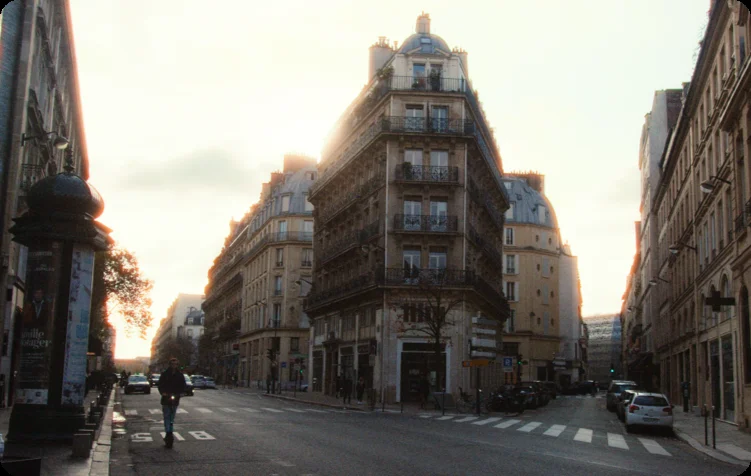
Dehancer Film has the largest stock library of the group, with 60+ negative and print emulations. Halation, grain, and bloom are physically modeled, which gives the results a consistency that preset-based approaches cannot fully replicate. The interface is dense and takes time to learn. There is no camera-specific input profiling, so the starting point is a generic input transform. At $179, it is the most complete option for colorists who want direct control over individual stock parameters.
FilmConvert Nitrate: camera-matched, $129
FilmConvert Nitrate starts from your camera's specific color science. It has profiles for most common cameras, which means the film emulation is calibrated to the actual sensor response rather than a generic input. The interface is clean and the learning curve is short. With 20+ film stocks and a grain editor, it covers most use cases. At $129, it is the cheapest paid option and the fastest to get a result from.
EMUL8: lightweight DCTL, 15 stocks
EMUL8 runs as DCTLs and Powergrades inside DaVinci Resolve Studio, which keeps it lighter than OFX-based competitors. The result is smooth playback even with multiple instances stacked. It has 15 stocks, all inspired by Kodak and Fujifilm, with controls for halation, bloom, grain (8mm to 65mm), chromatic aberration, and color density. At $196, it is close in price to Filmbox Looks and Dehancer, which makes it a harder sell unless performance is a specific constraint.
Filmkid 16: simple, accessible 16mm film look
Filmkid 16 brings a classic 16mm film look to DaVinci Resolve through a simple drag-and-drop PowerGrade. It is the most beginner-friendly option in this comparison: the package includes a tutorial video, full grading walkthrough, example clips, and an exclusive color settings guide. The node structure still gives experienced colorists plenty of room to customize. At $129, it is a straightforward, one-time purchase with no subscription, and it works with footage from any camera or phone.
spektrafilm OFX: the best free film emulation plugin Best Free
spektrafilm OFX is the most advanced free film emulation plugin for DaVinci Resolve. Instead of applying a LUT, it reconstructs the image as physical light spectra and runs it through negative exposure, development, optical printing, and scanning. The result is film color built from real sensitivity and density data. It ships with 16 camera-negative stocks and 8 print stocks and papers, plus format-scaled grain, pre-development halation, camera and print diffusion, scanner glare, blur, sharpening, and LUT export. A simplified spektrafilm-flow variant shares the same spectral engine and lets beginners build looks quickly. For anyone priced out of Dehancer, Filmbox, or EMUL8, this is the free alternative to beat.
Filmbox Looks wins on output quality. Its empirically modeled photochemical pipeline sets it apart from every other option at this price. Dehancer Film is the right call if you want the deepest parameter set and direct stock access, with 60+ physically modeled emulations. FilmConvert Nitrate is the fastest path to camera-matched film looks and the cheapest paid option at $129. EMUL8 is the best choice for performance-sensitive workflows: its DCTL architecture runs lighter than any OFX competitor in the group. Filmkid 16 is a simpler, more accessible option for beginners and creators who want a classic 16mm film look in seconds via a drag-and-drop PowerGrade with full node customization. spektrafilm OFX is the standout free alternative: it uses a full spectral simulation of the photochemical pipeline, ships with 16 negative and 8 print stocks/papers, and offers format-scaled grain, halation, diffusion, and LUT export. For creators who want cinema-grade film emulation without spending $129–$199, spektrafilm OFX is the best free option available.